Introduction
Modern enterprise environments rely heavily on third-party and internally developed applications to support daily operations. These applications frequently depend on Dynamic Link Libraries (DLLs) to load required functionality at runtime.
While DLL-based modular design improves efficiency and maintainability, improper configuration of DLL loading mechanisms can introduce security risks. Specifically, weaknesses in the Windows DLL search order may allow unintended or malicious DLLs to be loaded if directory permissions are misconfigured.
When this occurs, attacker-controlled code can execute within the context of a legitimate process. Depending on the privilege level of the target application, this may lead to:
Unauthorized code execution
Privilege escalation
Persistence opportunities
EDR interaction or behavioral manipulation
This article provides a technical deep dive into Windows DLL loading internals, explains how search order abuse works, presents controlled lab observations, and discusses defensive detection strategies.
What is a DLL?
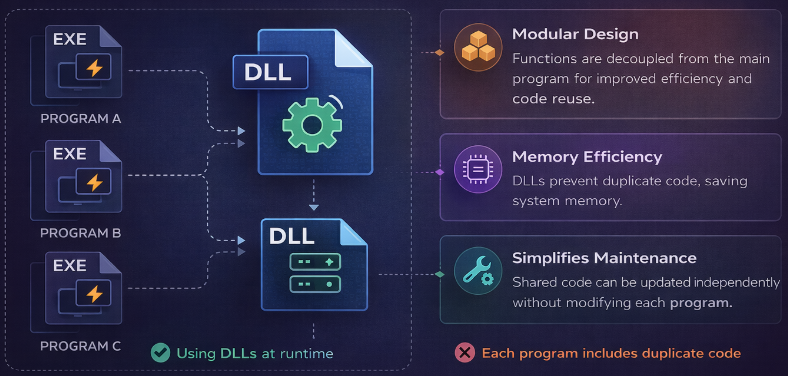
A DLL (Dynamic Link Library) is a file that contains reusable code and functionality that can be shared across multiple programs. Instead of embedding all functionality inside a single executable (EXE), Windows applications load required DLLs at runtime. This modular design reduces redundancy, improves memory efficiency, and simplifies maintenance. Windows itself relies heavily on DLLs to provide shared system functionality. Without DLLs, each application would need to include duplicate copies of common code, resulting in significant resource waste and increased system overhead.
How Windows Loads a DLL?
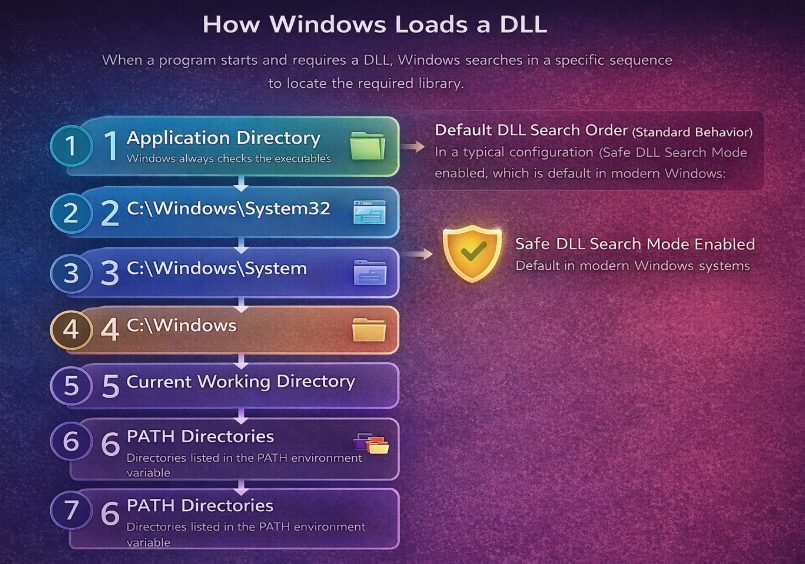
When a program starts and requires a DLL, Windows does not randomly load it. The Windows loader follows a predefined search order to locate the required library.
If the DLL is not found in one location, Windows continues searching through the next location in the sequence.
Understanding this order is essential when analyzing DLL search order abuse scenarios.
Default DLL Search Order (Standard Behavior)
In a typical configuration (Safe DLL Search Mode enabled, which is default in modern Windows versions), Windows searches in the following order:
Directory of the executable (Application directory)
Windows always checks the folder containing the executable first.C:\Windows\System32
C:\Windows\System
C:\Windows
Current Working Directory (CWD)
Directories listed in the PATH environment variable
DLL Internals
A DLL (Dynamic Link Library) is not merely a passive file containing reusable code. When loaded into a process, Windows maps the DLL into memory and may execute code inside it as part of the initialization sequence. Understanding this execution behavior is critical when analyzing DLL hijacking scenarios.
What Does "Loading a DLL" Actually Mean?
When a DLL is loaded:
The operating system maps the DLL into the process’s virtual memory.
The loader resolves imported functions.
Relocations are applied if necessary.
The entry point function
DllMain()is executed automatically.
It is important to note that Windows does not simply read the file — it executes code inside the DLL during the loading phase.
The DllMain Function
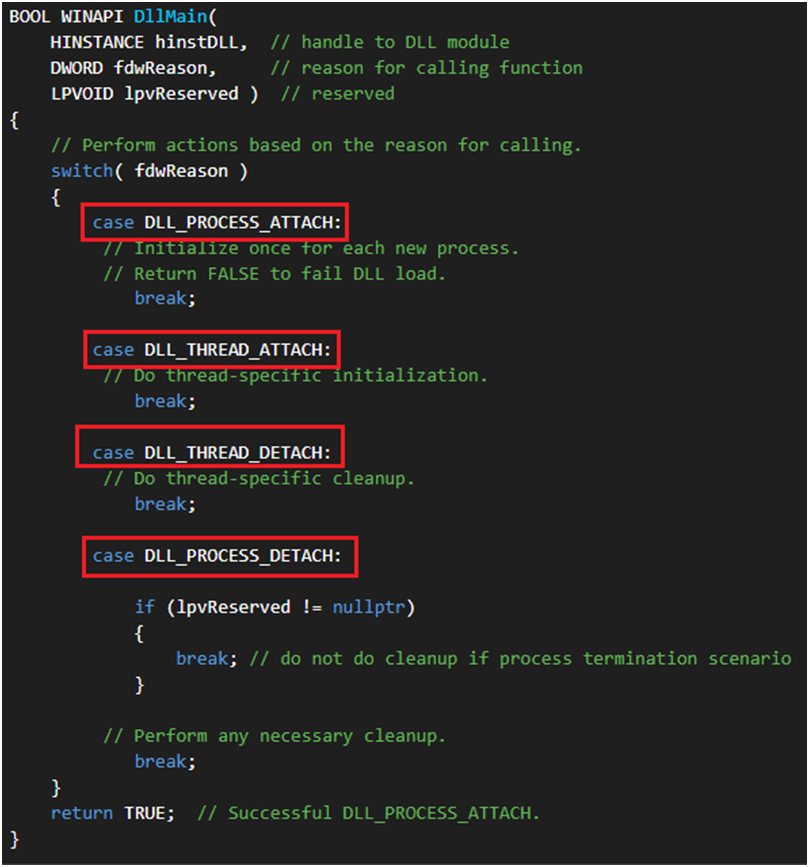
Every standard DLL contains an entry point called DllMain:
Understanding the Four DllMain Cases
Every standard Windows DLL contains an entry point function called DllMain. This function is automatically invoked by the Windows loader when specific events occur within the process lifecycle.
The fdwReason parameter determines why the function is being called.
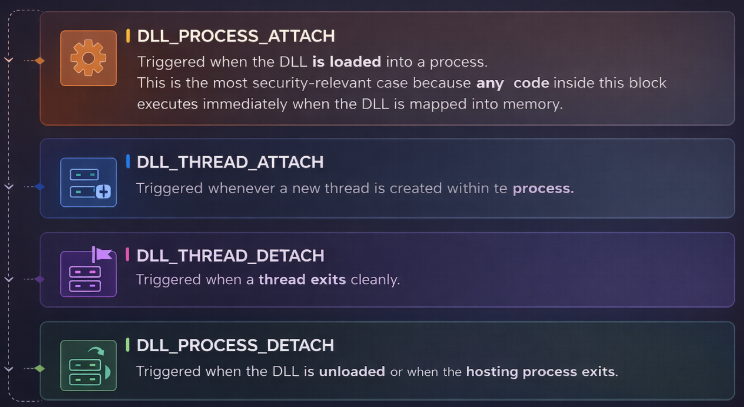
DLL_PROCESS_ATTACH Triggered when the DLL is loaded into a process. This is the most security-relevant case because any code inside this block executes immediately when the DLL is mapped into memory.
DLL_THREAD_ATTACH Triggered whenever a new thread is created within the process.
DLL_THREAD_DETACHTriggered when a thread exits cleanly.
DLL_PROCESS_DETACH Triggered when the DLL is unloaded or when the hosting process exits.
Security Perspective : From an offensive and defensive standpoint, DLL_PROCESS_ATTACH is the most significant case. If a malicious DLL is loaded due to search order abuse, code inside this block executes automatically within the context and privilege level of the target process.
If the target process runs as SYSTEM or Administrator, the DLL inherits those privileges.
DllMain and the Process Lifecycle
The four DllMain notifications directly correspond to the Windows process and thread lifecycle. In simple terms, Windows informs the DLL about lifecycle events so that it can execute appropriate initialization or cleanup logic.
A DLL often contains code that must run when:
A process starts
A thread is created
A thread exits
A process terminates
Windows communicates these lifecycle events by invoking DllMain with one of the four predefined reasons.
What Is the Process Lifecycle?
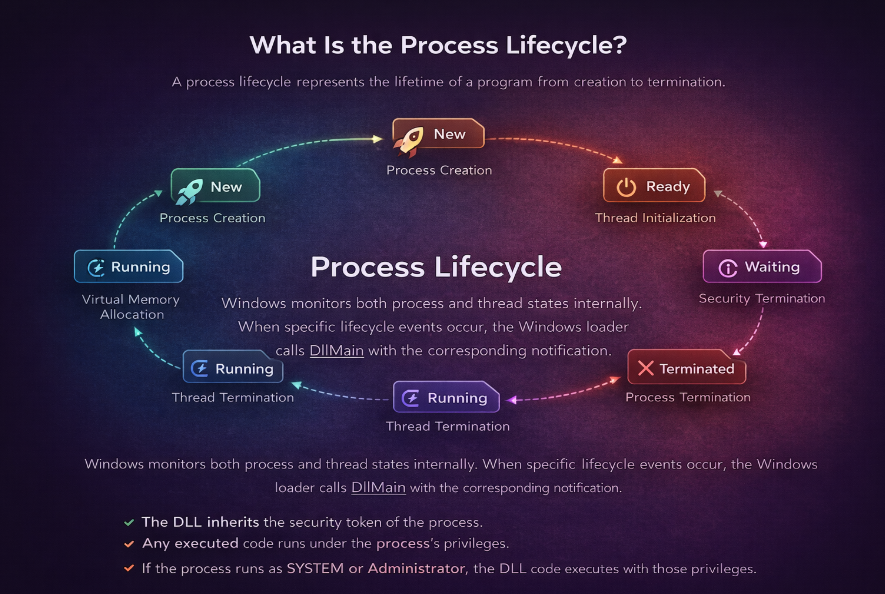
A process lifecycle represents the lifetime of a program from creation to termination.
It typically includes:
Process creation
Thread initialization
Virtual memory allocation
Security token assignment
Thread termination
Process termination
Resource cleanup on exit
Windows monitors both process and thread states internally. When specific lifecycle events occur, the Windows loader calls DllMain with the corresponding notification.
If the DLL implements logic for that notification, the code executes within the context and privilege level of the hosting process.
Controlled Lab Simulation
To understand the security implications of DLL search order abuse, a controlled lab environment was configured. The goal was to observe how a manipulated DLL could influence process behavior when placed in a writable directory within the DLL search path.
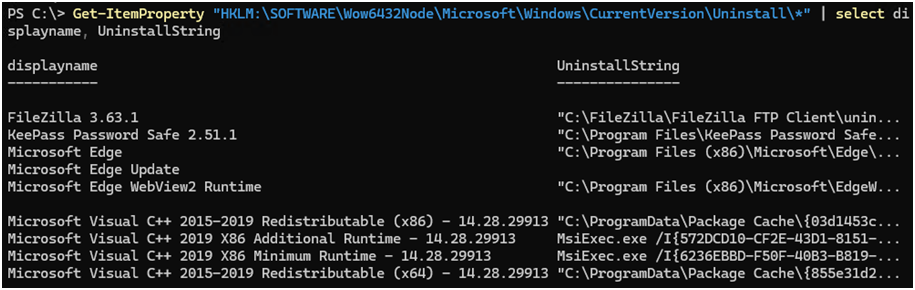
Step 1 – Application Enumeration
Installed third-party applications were enumerated to identify potential targets. Registry inspection was used to list installed software and associated uninstall paths.
Step 2 – Privileged Service Identification
Applications running with elevated privileges were analyzed, as these present higher security impact if compromised.

Step 3 – Directory Permission Assessment and Missing DLL Discovery
To determine whether DLL hijacking conditions were present, directory permissions of the target application were evaluated. Writable application directories can introduce risk if the application loads DLLs from those locations during startup.
To identify potential missing or unresolved DLL dependencies, Process Monitor (Procmon) was used in a controlled lab environment.
Using Procmon to Identify Missing DLLs
Procmon was configured to:
Monitor the target process during execution
Filter events specific to the application binary
Identify file system operations returning
NAME NOT FOUND

By filtering for file load attempts that resulted in NAME NOT FOUND, it was possible to observe whether the application attempted to load DLLs that were not present in its directory structure.
If the application attempts to load a DLL from a writable directory and that DLL does not exist, this may indicate a potential search order weakness.
If an attacker can place a malicious DLL in a higher-priority location within that search order, the malicious DLL may be loaded instead of the legitimate one.
Step 4 – Controlled Testing DLL Development
A test DLL was Developed and introduced into a writable location within the DLL search path to observe loader behavior.
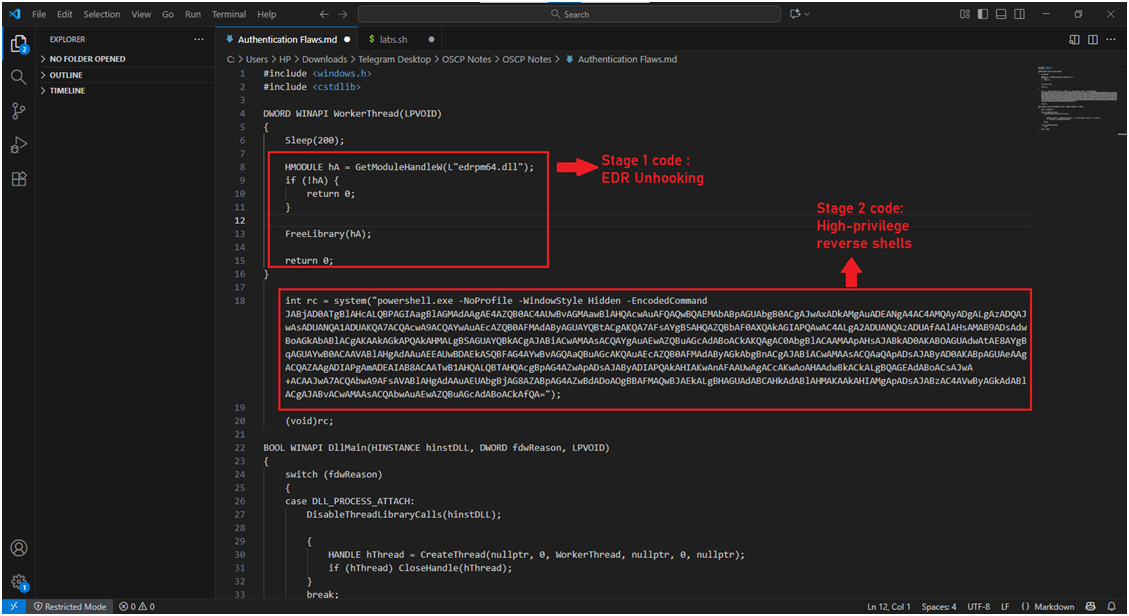
Stage-1 code:
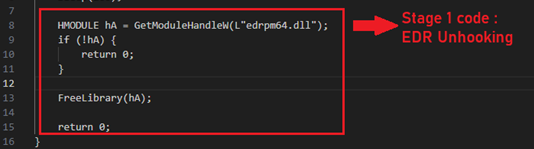
It will attempt to manipulate EDR DLL “edrpm64.dll” (Open source EDR), unhook the opensource EDR.
Stage-2 code:

If the host process runs with elevated privileges, the DLL logic executes with the same privileges and creates a reverse shell.
Step 4 – Transfer the dll file to Target machine and place it in the required folder, when application launched, malicious code gets executed.
The test confirmed that when a DLL is loaded into a privileged process, its code executes with the same elevated privileges, and gains the shell.
Detection & Defensive Strategies
After demonstrating how DLL Search Order Abuse works, it is critical to understand how defenders can detect and prevent this technique.
DLL hijacking leaves observable telemetry in Windows logs and EDR systems. By monitoring module loads, file creation events, and privilege context, defenders can identify suspicious behavior.
Behavioral Indicators of DLL Search Order Abuse
DLL search order abuse often includes one or more of the following indicators:
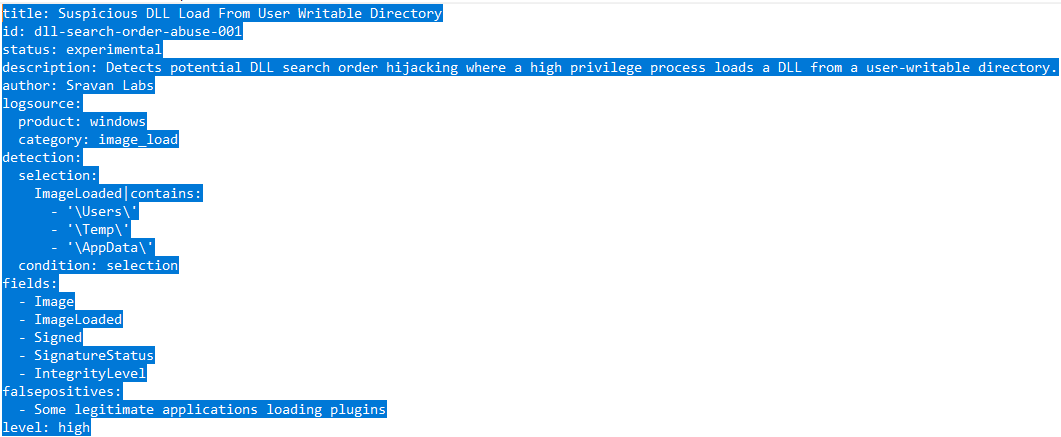
A DLL loaded from a user-writable directory
(C:\Users\,C:\Temp\,AppData\)A high-integrity or SYSTEM process loading a DLL from a non-standard location
An unsigned DLL loaded into a signed system binary
A recently created DLL file followed by immediate process execution
“NAME NOT FOUND” events before a successful DLL resolution
These anomalies deviate from normal Windows module loading behavior.
Log Sources Required
To properly detect this technique, enable:
Sysmon Event ID 7 (Image Load)
Sysmon Event ID 11 (File Creation)
Windows Security 4688 (Process Creation)
Without module load logging, DLL hijacking becomes harder to detect.
Splunk Query

Sigma Detection Rule
About the author
Security professional with hands-on experience in SOC operations, incident response, and threat hunting. I actively engage in malware research, exploit development, detection engineering, and OS internals analysis, with a focus on understanding EDR behavior. My goal is to bridge the gap between offensive research and defensive resilience, with a strong interest in both red team and blue team methodologies.
Comments
Join the discussionNo comments yet. Be the first to comment.